See who your campaign has visited but not yet contacted
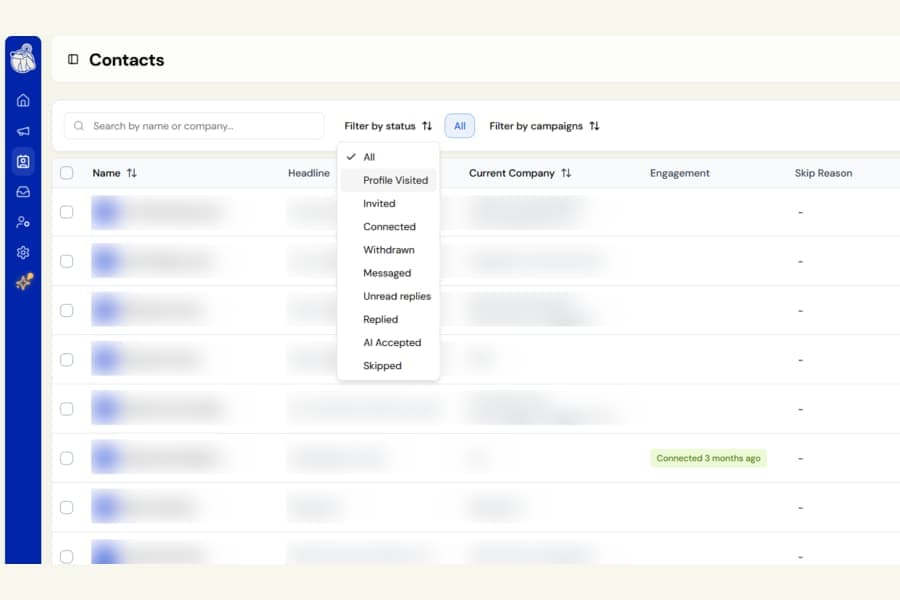
Your Contacts page now has a new Profile Visited status filter.
It shows people whose profile your campaign has opened, but who have not yet received an invitation or message.
What was missing
For campaigns that start with a profile visit, there was previously no easy way to see who was currently waiting at that stage.
You could already filter contacts who had been invited, connected, messaged, or replied, but people who had only been visited looked the same as contacts where nothing had happened yet.
What is new
Choose Profile Visited from the status filter to see exactly those contacts.
It appears above Invited, matching the order of the campaign journey.
The list updates automatically as your campaign progresses.
As soon as an invitation is queued or sent, or a message goes out, the contact leaves Profile Visited and appears under the appropriate status instead.
This means the filter shows where contacts stand right now, rather than everyone whose profile has ever been visited.
Use it with your other filters
You can combine Profile Visited with the rest of the Contacts page tools.
For example, you can:
- Filter by campaign or list
- Search within the results
- Select contacts for export
- Move selected contacts into another campaign
Who is not included
Contacts skipped by the campaign, such as duplicates or people on your blocklist, remain under Skipped with the reason shown.
People who were already connected with you appear under Connected.
If none of your campaigns start with a profile visit, this filter will simply remain empty.

