Stop retyping the same LinkedIn messages
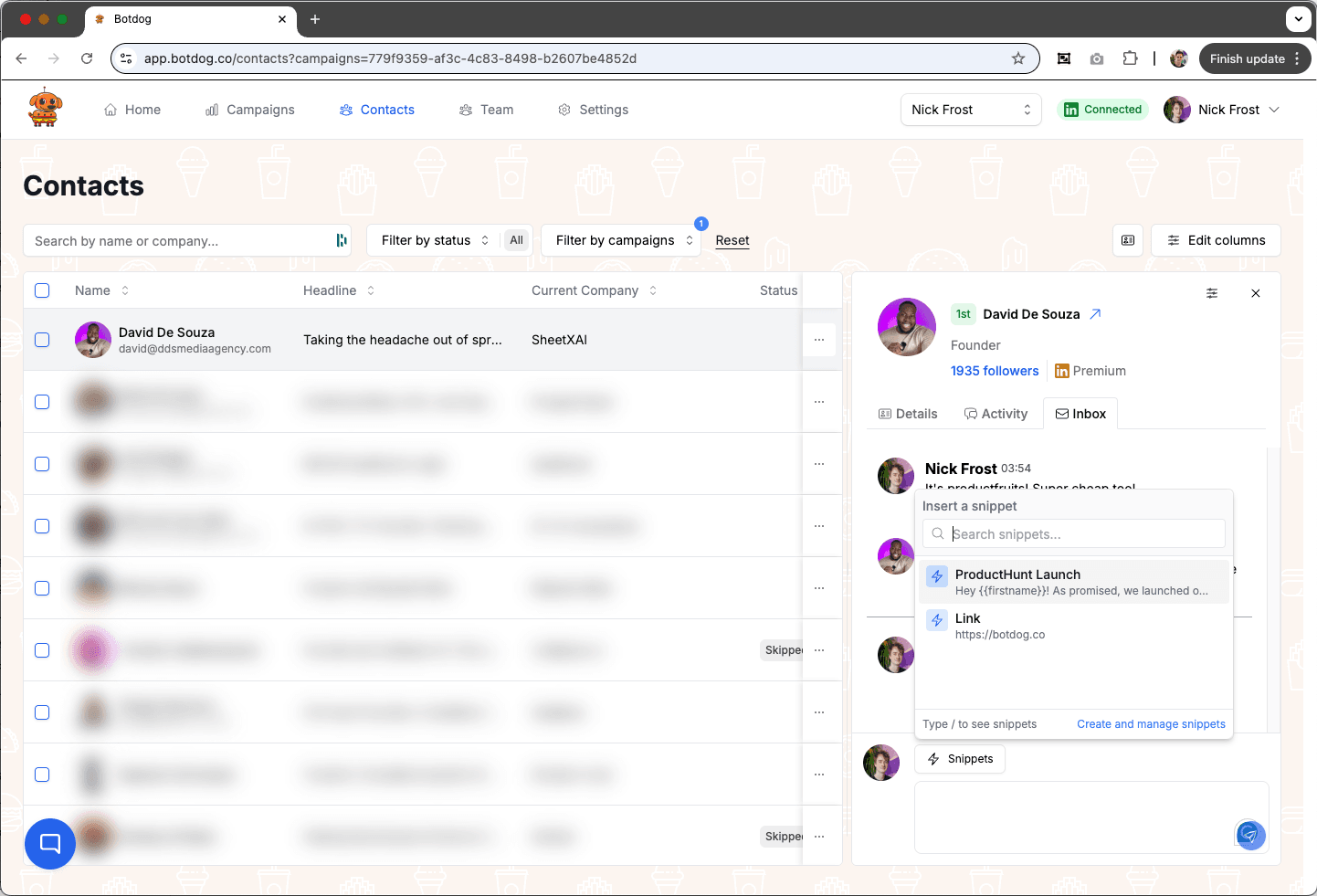
You've written the perfect answer to "what does Botdog cost?" forty times. Snippets save it once: type "/" in any reply box, pick the snippet, and it drops in, personalized with the lead's name, company and custom fields. Turn a message you just sent into a snippet without leaving the thread, or let an AI snippet draft the reply from a prompt.
See the Difference
Your best replies, one keystroke away
- ✕
Retyping
The same three answers, typed from scratch, with typos that vary by how tired you are.
- ✕
Copy-paste from a doc
A Google Doc of "good replies" that's never open when you need it.
- ✕
Personalization skipped
Under time pressure, "Hi there" beats looking up their name.
- ✓
Type "/"
Search your snippets by name or shortcut and insert in one keystroke, in the Unified Inbox and the contact drawer.
- ✓
Merge tags with preview
Click a chip to insert first name, last name, full name, company, title or a custom field, and see the rendered result as you write.
- ✓
Save from the conversation
Hover any message you sent and click "Save as snippet". Create and manage snippets from a dialog in the reply box.
Ready to transform your LinkedIn workflow?
Start Your 7-Day Free TrialNo credit card required • Cancel anytime
Snippets, Two Ways
Text snippets
Name, shortcut, content with merge tags. Team snippets so everyone answers the pricing question the same way.
AI snippets
Save a prompt instead of text, "reply warmly, ask which tool they use today", and Botdog drafts a tailored reply from the conversation when you insert it. Rate each result to tell us how it did.
Live preview, no guesswork
The editor renders your snippet with sample data as you type and flags a tag it doesn't recognise before you send it to anyone.
What people say about Botdog
Real stories. Real results.

Kate G.

I like that Botdog is very intuitive, making it easy even for someone who has never used it before or read any instructions to use it immediately. The initial setup was extremely easy, and it's well integrated with our other tools. It saves an enormous amount of time by automating LinkedIn outreach, allowing my sales team to take over only when a lead replies.

Valentin S.

Siva D.
Kathy L.
I like how easy it is to import and automate the request addition in Botdog. It's a simple search on the system and adding the link to Botdog is as simple as it gets. The initial setup was very simple; I just created a username and connected LinkedIn.
Mohamed A.
Botdog is straightforward and easy to use. It helps me get the tasks I need done - fast and without friction. I use it for product and service discovery, and it consistently leads me to insightful conversations with potential customers every week. It is still quite cheap in comparison with other tools.

Kamil J.
Toni H.
🚀 𝐈𝐟 𝐈 𝐖𝐞𝐫𝐞 𝐒𝐭𝐚𝐫𝐭𝐢𝐧𝐠 𝐌𝐲 𝐁𝐮𝐬𝐢𝐧𝐞𝐬𝐬 𝐓𝐨𝐝𝐚𝐲, I’d Skip Manual LinkedIn Engagement and Head Straight to 𝐁𝐨𝐭𝐝𝐨𝐠 💡

Eldad Stinbook
Cloud Evangelist | Infrastructu…
I subscribed -- in the seven-day free trial, I got several meetings booked. Much better response rate than my LinkedIn Sales Nav InMessages.

Greg Miller
Awesome team! Switching to bot dog - I've been using Dripify and it's wayyy too expensive for the value it provides.

Rasmus Chow
Botdog has completely changed how I approach LinkedIn outreach. I went from sending 10 connections a day manually to 100+ automated, and my response rate actually went up.
Sarah Johnson
VP Sales | SaaS
Best LinkedIn automation tool I've tried. Simple to set up, doesn't get your account flagged, and the team support is fantastic. Worth every penny.
Marco Bianchi
Founder | Agency
Kate G.
I like that Botdog is very intuitive, making it easy even for someone who has never used it before or read any instructions to use it immediately. The initial setup was extremely easy, and it's well integrated with our other tools. It saves an enormous amount of time by automating LinkedIn outreach, allowing my sales team to take over only when a lead replies.
Valentin S.
Siva D.
Kathy L.
I like how easy it is to import and automate the request addition in Botdog. It's a simple search on the system and adding the link to Botdog is as simple as it gets. The initial setup was very simple; I just created a username and connected LinkedIn.
Mohamed A.
Botdog is straightforward and easy to use. It helps me get the tasks I need done - fast and without friction. I use it for product and service discovery, and it consistently leads me to insightful conversations with potential customers every week. It is still quite cheap in comparison with other tools.
Kamil J.
Toni H.
🚀 𝐈𝐟 𝐈 𝐖𝐞𝐫𝐞 𝐒𝐭𝐚𝐫𝐭𝐢𝐧𝐠 𝐌𝐲 𝐁𝐮𝐬𝐢𝐧𝐞𝐬𝐬 𝐓𝐨𝐝𝐚𝐲, I’d Skip Manual LinkedIn Engagement and Head Straight to 𝐁𝐨𝐭𝐝𝐨𝐠 💡
Eldad Stinbook
Cloud Evangelist | Infrastructu…
I subscribed -- in the seven-day free trial, I got several meetings booked. Much better response rate than my LinkedIn Sales Nav InMessages.
Greg Miller
Awesome team! Switching to bot dog - I've been using Dripify and it's wayyy too expensive for the value it provides.
Rasmus Chow
Botdog has completely changed how I approach LinkedIn outreach. I went from sending 10 connections a day manually to 100+ automated, and my response rate actually went up.
Sarah Johnson
VP Sales | SaaS
Best LinkedIn automation tool I've tried. Simple to set up, doesn't get your account flagged, and the team support is fantastic. Worth every penny.
Marco Bianchi
Founder | Agency
Frequently Asked Questions About Message Snippets
Get answers to common questions about this Botdog feature
You can create reusable message templates in Botdog called snippets. Type /snippetname in any LinkedIn conversation to instantly insert your saved template. This is perfect for FAQ responses, meeting links, or standard introductions. You can create unlimited snippets for different scenarios.
Snippets work in conversations initiated through Botdog campaigns. Type /snippetname in any Botdog conversation to instantly insert your saved template. Note that snippets are typing shortcuts, not automation - you manually trigger them when needed.
No, snippets are manual typing shortcuts, not automation. You type /snippetname to insert the template, then send it yourself. Botdog doesn't reply to messages automatically for you. For automated messaging, use Botdog's Automated Sequences feature instead.
Create a snippet for your Calendly link in Botdog - for example, name it "meeting". Then in any Botdog conversation, just type /meeting and it instantly inserts your full scheduling link. Perfect for quickly sending meeting invites without copy-pasting every time.
Yes, create unlimited snippets for common responses like pricing info, FAQ answers, or case studies. Type /snippetname in any Botdog-initiated conversation to instantly insert your template. This saves hours each week on repetitive typing.
Ready to Make the Jump?
Join thousands of professionals who are growing their network on autopilot. Start your journey today with our 7-day free trial.

Trusted by 5,000+ sales professionals worldwide
