When you start posting on LinkedIn - whether you've just created an account, haven't posted regularly, or are trying to rebuild after low engagement - the algorithm is watching how people respond to your content.
If you get low engagement on your posts, LinkedIn assumes that your content isn't valuable. That said, it’s pretty hard to get high engagement, especially when you’re first starting out.
But there's a smarter way to crack the algorithm that most LinkedIn "gurus" won't tell you: build a network of people who already care about what you have to say.
This guide shows you exactly how to build genuine engagement on LinkedIn when you're starting from scratch - without triggering restrictions, without begging for likes, and without posting content that goes nowhere.
Step 1: Avoid the trap of going “all-in”
LinkedIn's algorithm doesn't trust new accounts. Think about it from their perspective - every day, thousands of spam accounts get created. Some want to scrape data, others push scams, and many exist solely to blast pitch-slaps across the platform.
So when you create an account and immediately start connecting with 50 people per day and posting twice a day, LinkedIn sees red flags everywhere.
When you move too fast:
- Connection requests get rejected at 2-3x normal rates
- Posts get shown to almost nobody (sometimes <10% of your network)
- Your account gets temporarily restricted from sending invitations
- Future content gets suppressed even after restrictions are lifted
The same applies to dormant accounts you're trying to resurrect. If your LinkedIn account has been sitting untouched for 6+ months, suddenly posting and sending connection requests looks suspicious. LinkedIn's algorithm treats reactivated dormant accounts similarly to new ones until you prove you're legitimate.
Before you do anything - before posting content, before mass connecting, before implementing any strategy in this guide - you need to warm up your account properly.
To make things easy, we’ve written a full guide about how to warm up your LinkedIn account. Or, if you’re using Botdog, we include built-in warm-up sequences that automatically pace your connection requests and messages to match natural human behavior without you having to track anything.
Step 2: Define your ICP
Once your account is warmed up, the single biggest mistake you can make is trying to appeal to everyone on LinkedIn, because writing to everyone means writing to no one. You end up creating content that feels generic and obvious rather than insightful and unique, so your value proposition gets diluted.
The most successful LinkedIn creators have a laser-focused Ideal Customer Profile (ICP). They know exactly who they're writing for, what challenges that person faces, and what language resonates.
Your LinkedIn ICP isn't just "people who might buy from me someday." It's a specific description of the person who:
- Has the exact problem you solve
- Has the authority to purchase your solution
- Is actively looking for answers on LinkedIn
- Will genuinely benefit from your content
To figure out your ICP, start with these questions:
- Who benefits most from what you offer?
- What's their job title? (Be specific: "VP Sales at 50-200 person SaaS companies" not "sales leaders")
- What's their seniority level? (Manager? Director? VP? C-level?)
- What industry are they in?
- What's their company size?
- What problem are you solving for them?
- What keeps them up at night?
- What metrics are they judged on?
- What's blocking them from hitting their goals?
- What tactical challenges do they face daily?
- How do they describe their challenges?
- What tone of voice/language do they use?
- What questions are they asking in LinkedIn posts and comments?
- What objections do they raise in sales calls?
- Where are they active on LinkedIn?
- Do they post regularly or just consume?
- Whose content do they engage with?
- What LinkedIn groups are they in?
Step 3: Write posts that your ICP actually cares about
Which topics should I write about?
Now that you know exactly who you're writing for, you can create content that speaks to them directly. Unfortunately, your ICP probably doesn’t care about generic motivational quotes or how excited you are about your latest feature update.
Instead, they care about:
- Solving the challenges they face today
- Learning from someone who's been in their position
- Practical advice they can implement immediately
- Understanding what's working for others like them
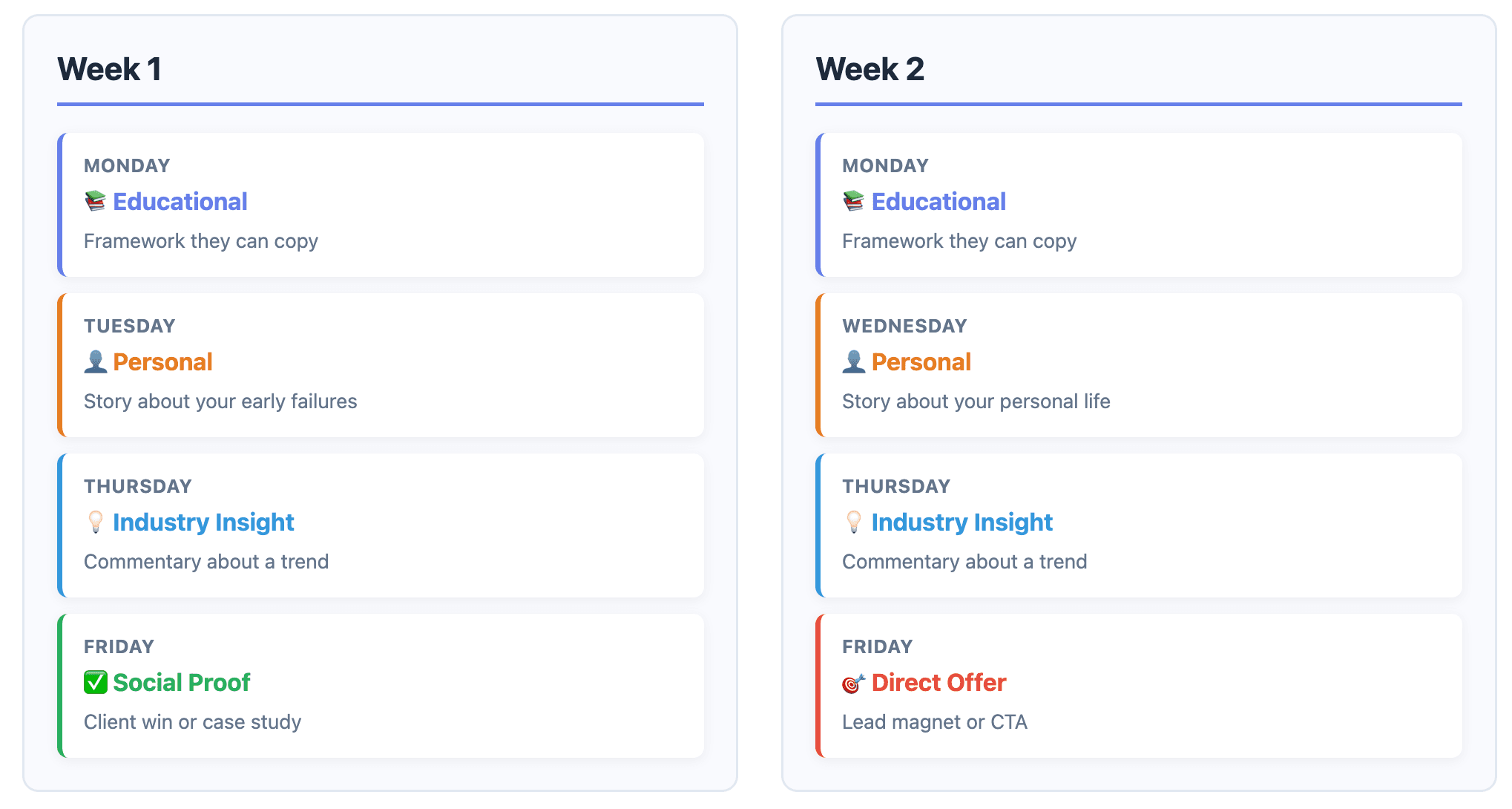
To make sure you hit every mark, try to organize your content into 4-5 clear pillars that align with your ICP's needs.
Pillar 1: Valuable/educational content (40-50% of posts) - content that directly helps your ICP solve their challenges.
Pillar 2: Personal/relatable content (15-20% of posts) - stories and experiences that build a connection with your audience. This is important because people buy from people they trust.
Pillar 3: Industry insights/trends (15-20% of posts) - your perspective on what's happening in your ICP's world. This positions you as someone who understands the landscape and can guide them through changes.
Pillar 4: Social proof/results (10-15% of posts) - evidence that your advice works and your solution delivers results. This works because your ICP needs to see proof that your approach works before investing time into following your advice or buying your solution.
Pillar 5: Direct offers/CTAs (5-10% of posts) - occasionally, you can write direct promotions, lead magnets, or calls to action, but only after you’ve built trust with your audience through valuable content.
Try this content calendar:
How do I write a scroll-stopping hook?
The first 2-3 lines of your post determine how many people will read it. LinkedIn shows your content to a small sample of your network first, and if they scroll past, then LinkedIn will assume it's not valuable.
Bad hooks are generic and give people no reason to keep reading, whereas good hooks are specific, create curiosity, and promise value.
Give these hook formulas a try…
1. The surprising statistic:
"[X]% of [your ICP] are doing [thing] wrong. Here's why it matters..."
"67% of sales teams still use LinkedIn basic accounts for prospecting. They're leaving money on the table..."
2. The personal story:
"[X time period] ago, I [struggled with specific problem]. Here's what finally worked..."
"Three months ago, I was booking 5 meetings per month. Last month I hit 28. Here's what changed..."
3. The contrarian take:
"Everyone says [common belief]. Here's why they're wrong..."
"Everyone says personalization is key to LinkedIn outreach. But I tested 500 messages and found something surprising..."
4. The problem callout:
"If you're [struggling with specific problem], this is probably why..."
"If you're getting ghosted on LinkedIn, you're probably making one of these 3 mistakes..."
5. The results-first opening
"[Specific result] in [timeframe]. Here's exactly how..."
"40% acceptance rate on LinkedIn connection requests. Here's the exact process..."
After you write your hook, ask yourself:
- Would my ICP stop scrolling to read this?
- Does it promise specific value relevant to their challenges?
- Is it specific (not generic fluff)?
- Does it create curiosity without being clickbait?
If you can't answer "yes" to all four, rewrite the hook.
Step 4: Build a network full of ICPs
LinkedIn has 1 billion users. Your ideal prospects are buried in there somewhere, but they're not going to magically discover you. Even if you're posting amazing content consistently, you're shouting into a void if your network is full of:
- Random recruiters who connected years ago
- Former colleagues who aren't your ICP
- Competitors keeping tabs on you
- Inactive accounts that never engage
The easiest solution is to systematically build a network of people who match your ICP profile. But you can't just spam connection requests to everyone, because you’ll trigger LinkedIn restrictions if too many of them decline or don’t respond.
Instead, try a tiered connection strategy that prioritizes the warmest prospects first.
Tier 1: Warmest prospects
These are people who already know you exist and have shown some interest.
- People who liked or commented on your posts
- Attendees of your webinars or events
- People who replied positively to emails
- Referrals from mutual connections
- Website visitors who match your ICP (if you have visitor tracking)
These are Tier 1 prospects. They’re already warm because they've engaged with you, so there’s a lower risk of your account being marked as spam. Plus, there’s a high likelihood they’ll engage with your posts in the future.
How to find them:
- Export post engagement using Botdog's engagement export feature
- Track webinar/event attendees from your hosting platform
- Monitor email replies in your CRM
- Note referrals in your sales pipeline
Tier 2: Active cold prospects
These are people who fit your ICP perfectly but don't know you yet.
- Job titles and company sizes matching your ICP
- Active on LinkedIn (posted in last 30 days)
- In industries you serve
- Geographic regions you target
How to find them:
- LinkedIn search with specific filters (job title, company size, industry)
- Sales Navigator for advanced filtering (if you have it)
- LinkedIn groups where your ICP hangs out
- People who engage with your competitors' content
Tier 3: Second-degree connections
These are people connected to your existing network. Mutual connections often build instant credibility and can lead to referrals and introductions.
- 2nd-degree connections to people you know
- Shared connections with current customers
- In the same LinkedIn groups as your ICP
How many connection requests should I send?
LinkedIn’s connection request limits depend on your account type:
- Free accounts: ~50 connection requests per week
- Premium accounts: ~150-200 connection requests per week
The safest strategy is to spread your requests throughout the week instead of sending them all at once. On weekdays (Monday to Friday), aim to send 10-15 requests per day (Premium) or 7-10 per day (Free). Focus on Tier 1 first (warmest prospects), and fill remaining slots with Tier 2 (targeted cold prospects). Don't send requests on weekends, because acceptance rates drop 75%.
Manually tracking Tier 1, Tier 2, and Tier 3 prospects is pretty time-consuming, and remembering to send connection requests every day without going over limits can get tedious.
Botdog automates the entire tiered connection strategy, so you can focus on creating great content while Botdog handles building your network with the right people.
- Import your prospect lists from multiple sources:
- LinkedIn searches (paste search URL, we extract prospects)
- Post likers and commenters (we export engagement data automatically)
- Event attendees (upload CSV, we match to LinkedIn profiles)
- Sales Navigator lists (if you have it)
- Automatically send connection requests at optimal times:
- Spread requests throughout the week naturally
- Vary sending times to mimic human behavior
- Automatically pause on weekends
- Never exceed LinkedIn's safe limits
- Track acceptance rates by source:
- See which prospect sources perform best
- Optimize your targeting based on real data
- Identify which Tier 1 sources convert the highest
- Auto-withdraw old pending requests:
- Keep your account healthy
- Re-engage prospects who missed your first request
- LinkedIn penalizes accounts with 500+ pending requests
- Follow up automatically after acceptance:
- Send personalized message 2-4 hours after they accept
- Continue sequences based on engagement
- Stop messaging if they reply (automatic detection)
Start your 7-day free trial and see how easy systematic network building can be.
Step 5: Understand the algorithm (enough to make it work for you)
LinkedIn's algorithm is constantly changing, and it’s impossible to understand it fully. But you don't need to master every detail. You just need to understand the basics that determine whether your posts get promoted or buried.
The golden hour
When you publish a post, LinkedIn shows it to a small sample of your network first - typically 10-20% of your connections and followers.
If you get high engagement in the first hour:
- LinkedIn expands reach to more of your network
- Algorithm tests it with 2nd-degree connections
- Organic reach compounds over next 24-48 hours
If you get low engagement in the first hour:
- LinkedIn stops promoting it almost immediately
- Your post dies in the feed with minimal impressions
- Future posts get shown to fewer people
- Your reach compounds downward over time
When to post
Always aim to post when your ICP is actively checking LinkedIn. For most B2B professionals, there are three LinkedIn check-in windows:
- 8:00-10:00am: Before meetings start, checking feed with morning coffee
- 12:00-2:00pm: Lunch break scrolling
- 5:00-7:00pm: End of workday wind-down
If your ICP is US-based and you want maximum reach, post between 9:00-11:00am Eastern Time (accounts for multiple time zones). If your ICP is global, test different times and track which gets the best first-hour engagement.
Consistency matters more than perfect timing. Posting at the same time 3-5x per week trains LinkedIn's algorithm on when to expect your content and when to show it to your network.
Engage to get engagement
The LinkedIn algorithm rewards reciprocal engagement. If you never engage with other people's content, why would they engage with yours?
Before you post your content, spend 15 minutes engaging with others:
- Comment on 5-10 posts from people in your network
- Leave thoughtful 15+ word comments (short comments get suppressed)
- Ask questions or add insights, don't just say "Great post!"
- Focus on posts from your Tier 1 connections and recent connections
Then, after you post, engage immediately:
- Reply to every comment on your post
- Ask follow-up questions to keep conversation going
- DM 3-5 close connections: "Just posted about [topic] - would love your take on it"
15-60 minutes after posting:
- Continue replying to comments as they come in
- Thank people who engage (builds relationship)
- Engage with a few more posts from your network
1-24 hours after posting:
- Check engagement every 2-3 hours
- Reply to new comments within 1 hour
- DM everyone who liked/commented
Outside of this engagement strategy, also spend time commenting on posts from outside your network. Focus on posts that your ICP might also be engaging with, because if you target posts with <50 comments (easier to get visibility), leave 15+ word comments that add genuine value, and ask thoughtful questions that spark conversation, you can connect with your ICP without spending a connection request on them.
Avoid relying on AI
LinkedIn's algorithm can detect AI-generated phrases, so if you're using ChatGPT or other AI tools to write posts (which is fine for drafting), you MUST edit them before publishing.
- Read every post out loud before publishing
- If it doesn't sound like something you'd actually say, rewrite it
- Remove formal business jargon
- Add contractions (you're, it's, don't)
- Add personal touches
- Insert specific examples from your experience
- Use simple, conversational language
- Add your personality (humor, perspective, opinions)
- Check for generic statements
- AI loves to write "this is important" without explaining why
- Replace generic claims with specific insights
- Add data or examples to back up points
What LinkedIn's algorithm rewards
- Content that keeps people on LinkedIn
- Long-form posts with 1500+ characters get more reach (higher "dwell time")
- Documents/carousels where people swipe through all slides
- Videos that people watch to the end
- Posts that spark lengthy comment conversations
- Content that drives meaningful conversations
- Posts with 10+ comments perform better than posts with 100+ likes
- Back-and-forth comment exchanges signal quality
- Questions that invite specific answers (not generic "what do you think?")
- Content from engaged creators
- Regular posting schedule (3-5x per week)
- Consistent engagement with other posts
- Reply rates to comments on own posts
- Active DM conversations
- Content that performs well immediately
- First-hour engagement is critical
- Early saves/shares trigger broader distribution
- Comments from people with large networks expand reach
Step 6: Redefine what success looks like
Most LinkedIn gurus put too much weight on vanity metrics like getting 10,000 impressions, 500 likes, 50 comments, or going viral. Sure, big numbers feel good and look impressive in screenshots, but they don’t pay your bills.
A post with 100 impressions that generates 5 warm leads is infinitely more valuable than a post with 100,000 impressions from random people outside your ICP.
Try tracking these metrics…
- Impressions from your ICP
- Profile views from people with your target job titles
- Engagement from people at target company sizes
Comments from prospects in your target industries
If you're getting 1,000 impressions but only 50 are from your ICP, you're wasting effort. Better to get 200 impressions with 150 from your ICP.
2. Meaningful conversations started
Likes are nice. Comments are better. But what really matters is conversations that move toward business outcomes.
- DMs from prospects asking about your services
- Comments that lead to deeper discussions
- Connection requests from people in your ICP
- Meeting requests that originated from LinkedIn content
3. Pipeline influenced by LinkedIn
- Tag deals that originated from LinkedIn connections
- Note when prospects mention seeing your content
- Track meetings that resulted from LinkedIn DMs
- Attribute revenue to LinkedIn-sourced relationships
When someone books a meeting or becomes a customer, ask: "How did you first hear about us?" If they mention LinkedIn, tag that deal accordingly in your CRM.
4. Quality network growth
- New connections per week who match your ICP
- Acceptance rate on connection requests (should be 40%+)
- Percentage of your network that matches ICP criteria
- Engagement rate from new connections (are they liking/commenting?)
The 90-day (realistic) timeline
Most LinkedIn gurus promise unrealistic results. "Go viral in 30 days!" "10x your engagement in two weeks!" Here's what to actually expect:
Month 1: Foundation building
- Warming up your account (if new/dormant)
- Defining and refining your ICP
- Testing content pillars to see what resonates
- Building initial network with Tier 1 prospects
Month 2: Momentum building
- Posting consistently 3-5x per week
- Expanding network with Tier 2 prospects (targeted cold outreach)
- Engaging strategically with others' content daily
- Refining content based on what performed best in Month 1
In Month 2, you'll start to see patterns:
- Certain content pillars perform better
- Specific ICPs engage more than others
- Posts at certain times get better first-hour engagement
- Your network starts to recognize your name
Month 3: Compounding results
- Maintaining consistent posting schedule
- Doubling down on content that works
- Systematically growing network with all tiers
- Engaging daily to maintain algorithmic momentum
In Month 3:
- Your network recognizes you as a consistent creator
- LinkedIn's algorithm trusts you and expands your reach
- New connections come to you (not just you reaching out)
- Content you post gets immediate engagement
The bottom line…
Building genuine LinkedIn engagement from a new or dormant account won’t happen overnight, because it's a systematic process that compounds over time.
If you post randomly, connect with everyone regardless of relevance, chase vanity metrics and virality, or expect results in the first two weeks… you probably won’t feel like things are going well.
Instead, define your ICP with precision, create content that solves their specific problems, systematically build a network of people who care, engage consistently and authentically, and track business impact, not just likes.
If you want to boost engagement, the timeline is 90 days minimum. In month one, engagement will be low, but in month two, you’ll start building momentum. In month three, you’ll probably start seeing results, and by month six, LinkedIn will hopefully be a legitimate source of pipeline and revenue for your business.
Are you ready to build real LinkedIn engagement without spending hours per day on manual outreach?
Botdog makes it simple to systematically build a network of prospects who actually engage with your content and convert them into customers:
✅ Automatically connect with warm prospects (customers, event attendees, post engagers)
✅ Expand your network with targeted ICP matches at optimal times
✅ Follow up with new connections using personalized message sequences
✅ Track performance and optimize based on real data
✅ Stay completely safe with built-in LinkedIn compliance features
Start your 7-day free trial and see why 1,000+ salespeople use Botdog to turn LinkedIn into their most predictable pipeline source. No credit card required. Set up your first campaign in 3 minutes. Cancel anytime.