How To Manage Multiple LinkedIn Accounts With Botdog
Managing multiple LinkedIn accounts shouldn't be a security and operational nightmare. Botdog lets your team or clients delegate access without sharing passwords. Switch between accounts instantly, manage conversations for anyone, and scale your outreach safely.
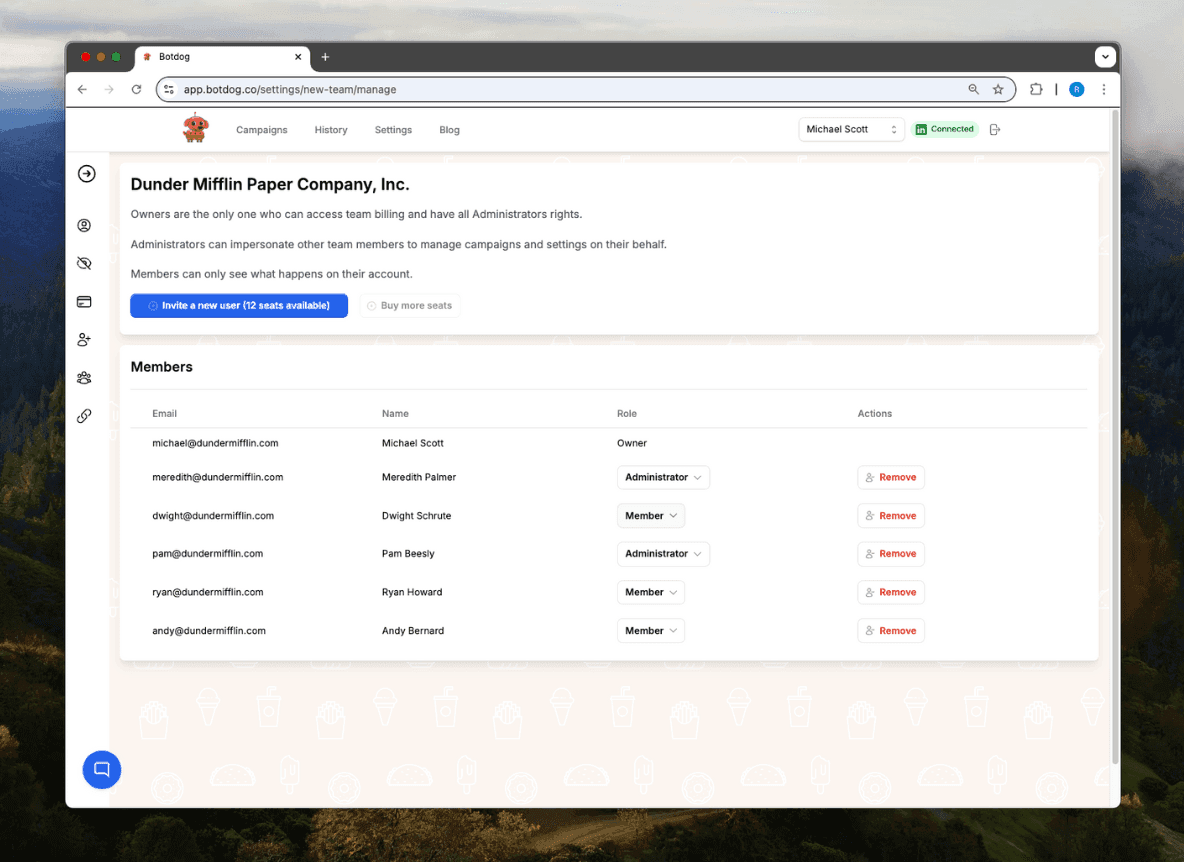
See the Difference
Manage client LinkedIn accounts from one dashboard
- ✕
Juggling client accounts
Logging in and out of 10+ LinkedIn accounts daily. Constantly confused about which account you're managing
- ✕
No centralized management
Can't manage your team's LinkedIn campaigns from one place. Each account requires separate login and management
- ✕
Context switching kills productivity
Jumping between accounts wastes 20+ minutes per day. Mental overhead of remembering each client's strategy
- ✓
All accounts in one dashboard
Manage every client's LinkedIn account from a single interface. Switch between accounts instantly without logging in and out
- ✓
Manage on their behalf
Handle campaigns and conversations for your team members or clients. Perfect for agencies managing multiple client accounts
- ✓
Stay in flow state
No more context switching. Manage all clients efficiently from one place. Each account has its own reporting and settings
Ready to transform your LinkedIn workflow?
Start Your 7-Day Free TrialNo credit card required • Cancel anytime
Multi-Account, Zero Friction
Safe access
Let team members or clients delegate their LinkedIn accounts without sharing passwords. They control exactly what you can access, and you manage everything through Botdog.
Quick switch
Switch between accounts instantly, manage conversations for anyone, and keep track of all activity in one place. No more logging in and out of LinkedIn.
Scale up
Run outreach campaigns across multiple accounts to get more results. Perfect for agencies managing client accounts or sales teams working together to hit bigger numbers.
What people say about Botdog
Real stories. Real results.
Jul 11, 2025
🚀 𝐈𝐟 𝐈 𝐖𝐞𝐫𝐞 𝐒𝐭𝐚𝐫𝐭𝐢𝐧𝐠 𝐌𝐲 𝐁𝐮𝐬𝐢𝐧𝐞𝐬𝐬 𝐓𝐨𝐝𝐚𝐲, I’d Skip Manual LinkedIn Engagement and Head Straight to 𝐁𝐨𝐭𝐝𝐨𝐠 💡
When I began building my business, LinkedIn engagement seemed like the go-to for networking and growth. But looking back, I see it drained more time, energy, and money than it delivered in results.

Eldad Stinbook
Cloud Evangelist | Infrastructu…



Jul 22, 2024
I subscribed -- in the seven-day free trial, I got several meetings booked. Much better response rate than my LinkedIn Sales Nav InMessages.

Greg Miller
Apr 23, 2025
Awesome team! Switching to bot dog - I've been using Dripify and it's wayyy too expensive for the value it provides.

Rasmus Chow
Mar 15, 2025
Botdog has completely changed how I approach LinkedIn outreach. I went from sending 10 connections a day manually to 100+ automated, and my response rate actually went up.
Sarah Johnson
VP Sales | SaaS
Feb 8, 2025
Best LinkedIn automation tool I've tried. Simple to set up, doesn't get your account flagged, and the team support is fantastic. Worth every penny.
Marco Bianchi
Founder | Agency
Jul 11, 2025
🚀 𝐈𝐟 𝐈 𝐖𝐞𝐫𝐞 𝐒𝐭𝐚𝐫𝐭𝐢𝐧𝐠 𝐌𝐲 𝐁𝐮𝐬𝐢𝐧𝐞𝐬𝐬 𝐓𝐨𝐝𝐚𝐲, I’d Skip Manual LinkedIn Engagement and Head Straight to 𝐁𝐨𝐭𝐝𝐨𝐠 💡
When I began building my business, LinkedIn engagement seemed like the go-to for networking and growth. But looking back, I see it drained more time, energy, and money than it delivered in results.
Eldad Stinbook
Cloud Evangelist | Infrastructu…
Jul 22, 2024
I subscribed -- in the seven-day free trial, I got several meetings booked. Much better response rate than my LinkedIn Sales Nav InMessages.
Greg Miller
Apr 23, 2025
Awesome team! Switching to bot dog - I've been using Dripify and it's wayyy too expensive for the value it provides.
Rasmus Chow
Mar 15, 2025
Botdog has completely changed how I approach LinkedIn outreach. I went from sending 10 connections a day manually to 100+ automated, and my response rate actually went up.
Sarah Johnson
VP Sales | SaaS
Feb 8, 2025
Best LinkedIn automation tool I've tried. Simple to set up, doesn't get your account flagged, and the team support is fantastic. Worth every penny.
Marco Bianchi
Founder | Agency
Frequently Asked Questions About Teams & Agencies
Get answers to common questions about this Botdog feature
Create a team and invite members who can share access to their LinkedIn accounts. With permission, you can manage their campaigns. Each account maintains its own quotas and settings. This helps you stay organized and respond quickly to interested prospects.
You can create teams and invite members to share access to their LinkedIn accounts. With permission, you can manage campaigns on their behalf while each account maintains its own quotas and settings.
Yes, this is very safe. Teams & Agencies is a management feature that helps you organize multiple accounts. Botdog mimics human behavior with random delays, respects LinkedIn's limits, and only operates during business hours. We strongly recommend Premium LinkedIn accounts for overall safety.
With Botdog's Teams & Agencies feature, you can manage multiple client LinkedIn accounts from one dashboard. Invite team members, get permission to manage their campaigns, and run outreach on their behalf while each account maintains its own quotas and settings.
Yes, invite clients to your team and with their permission, you can create and manage LinkedIn campaigns on their behalf. Each client account maintains its own quotas and settings, while you control everything from a centralized dashboard.
Create a team in Botdog and invite members to share access to their LinkedIn accounts. With permission, your team can manage campaigns for multiple accounts while maintaining separation and confidentiality for each user.
Ready to Make the Jump?
Join thousands of professionals who are growing their network on autopilot. Start your journey today with our 7-day free trial.

Trusted by 5,000+ sales professionals worldwide