CRMs are like goldmines. But most salespeople (including your competitors) ignore them and focus on newer, shinier prospects instead.
Why old leads are better than new ones
If you open your CRM and look at the numbers, you probably have 10-25x more dormant leads than active deals sitting there gathering dust.
These are missed opportunities because they’re people who already know who you are and have shown some level of interest at some point. The problem they wanted to solve probably still exists - they just got busy, distracted, or overwhelmed.
Compare that to a brand new cold lead who's never heard of you, doesn't know what you do, and costs money to acquire. A dormant lead who already raised their hand is worth 5-10x more than starting from scratch.
Which dormant leads are worth re-engaging?
- Discovery call no-shows
These are prospects who booked a discovery call but never showed up. They ghosted your follow-up emails, and you eventually gave up.
The reality is that they probably ghosted you because they got busy with competing priorities, got cold feet about making changes, or the timing wasn't right. Sometimes they might have just forgotten and felt too awkward to reschedule.
Wait 30-90 days, then reach back out. Enough time has passed that it's not weird anymore, and their original problem probably still exists.
2. Stalled deals
These are prospects who made it through discovery calls, received proposals or pricing, expressed interest in moving forward, then went silent.
Maybe their budget got frozen, their internal champion left the company, an executive vetoed the project, or competing priorities took over. Maybe they went with a competitor but aren't happy about it.
Give them 60-120 days to realize they still need a solution, then check back in. Many stalled deals just need time to become urgent again.
3. Cold engaged leads
These are people who downloaded your guides, attended your webinars, or replied to your cold outreach with interest but never actually booked a call.
Maybe they're still researching solutions, the problem isn't urgent enough yet, or they need to build an internal case before reaching out.
Wait 90-180 days. They're still researching, and when they're ready to buy, you want to be top of mind.
4. Lost opportunities
You know they went with a competitor - you lost the deal 6-12 months ago and moved on.
But implementations often fail or underdeliver, contracts come up for renewal, and their needs evolve. The grass isn't always greener with your competitor.
Wait 6-12 months for buyer's remorse or renewal cycles to kick in, then reach back out with a simple question about how their chosen solution is working.
5. Churned customers
These are former customers who cancelled 6-12 months ago because of missing features, pricing concerns, or onboarding issues.
They already know your product works, so if you've built the features they needed, improved your onboarding, or adjusted pricing, there's a real opportunity to win them back.
Our LinkedIn re-engagement strategy
Sending "just checking in" emails probably won't win back a dormant lead. Instead, LinkedIn works better because it meets prospects where they're actually active. Your content will appear organically in their feed, and it feels less intrusive than emailing or calling, even if you use multiple touchpoints.
Step 1: Connect without pressure
Send a simple LinkedIn connection request with no message. Let them accept based on recognizing your name and company. Connection requests without notes actually have higher acceptance rates because they're less salesy.
Step 2: Let your content do the talking
Once you’re connected, they’ll start seeing your content in their feed. Try to post about case studies from similar companies, new features you've shipped, industry trends they care about, or competitor comparisons that address their original concerns.
The goal is to remind them of the problem they wanted to solve and show that you've evolved since they last looked at you.
Step 3: Don’t pitch
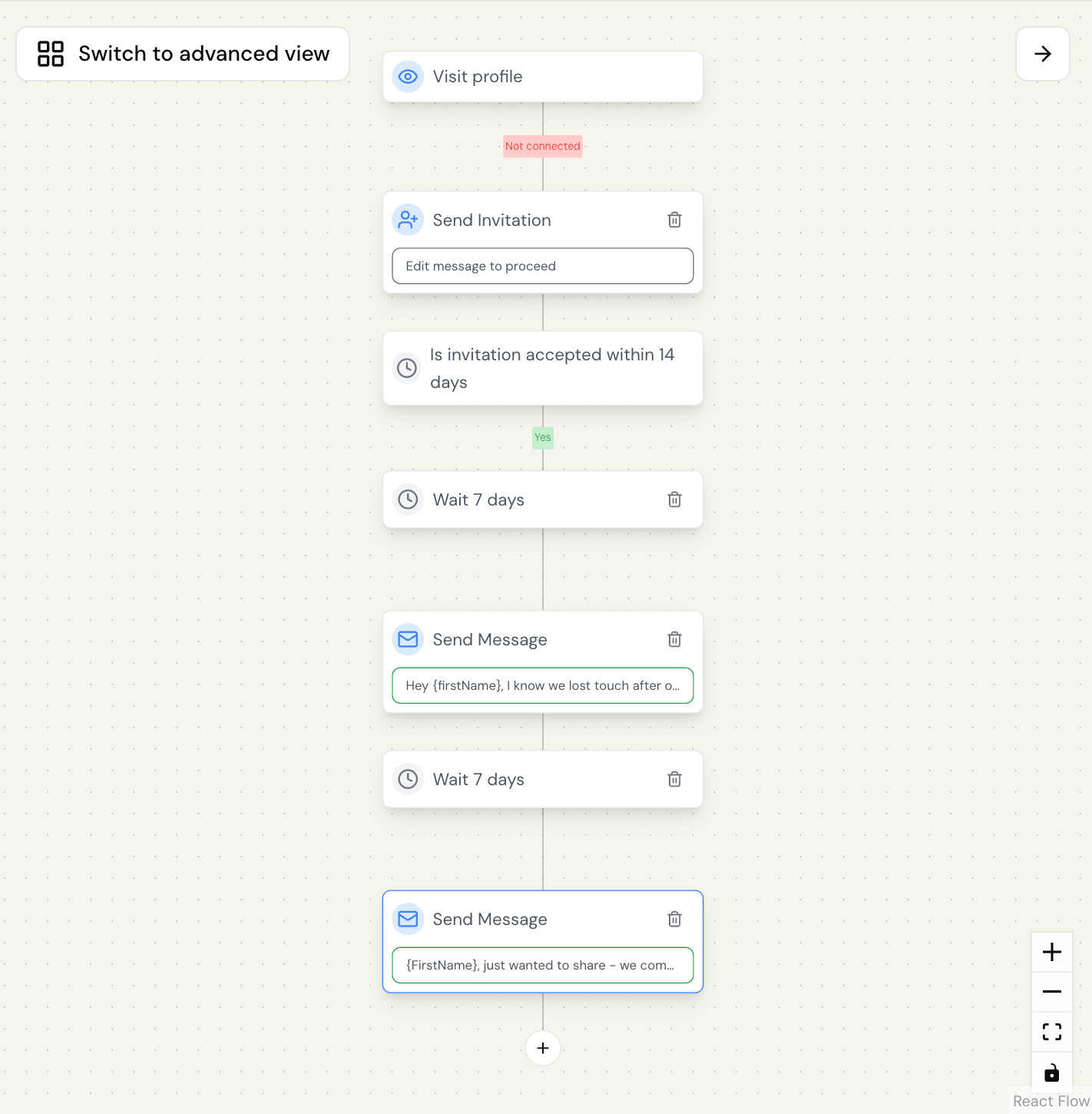
After 7-10 days, send your first message. Don't pitch or ask for a call. Just acknowledge the gap and ask a simple question.
- For stalled deals: "Hey {firstName}, I know we lost touch after our conversation about [project] back in [month]. Did you end up solving [challenge] or did you sideline it for now?"
- For cold engaged leads: "Hey {firstName}, I think you grabbed our [content title] guide a while back. Did you find it useful? Or are you still figuring out the [challenge] piece?"
- For lost opportunities: "Hey {firstName}, it's been a while since we talked about [project]. I know you ended up going with [competitor]. Curious how that's been working out for you?"
The goal is to acknowledge what happened without being awkward, show you remember their specific challenge, and give them an easy out if they've moved on.
Step 4: Follow up with more value
If they don't respond to your first message, wait another week and follow up with something that actually helps them. Share a relevant case study, mention a new feature that solves their original objection, or offer insights without asking for anything.
"{firstName}, just wanted to share - we completely revamped [area that caused concern]. [New approach] + [new feature] is a way better experience for companies like [their company]. Not trying to win you back (yet 😄), but thought it was worth sharing how far we've come."
If there's still no response after two or three messages, move them to a 90-day nurture sequence and try again later.
What to do when they respond
If (and when) prospects respond, remember that you’re on your second chance and be willing to go the extra mile. When someone says "yes, let's talk again," don't just send a calendar link, offer specific times: "Great! A lot has changed since [month] - both on your end and ours, I'm sure. I'm free Tuesday at 2pm or Thursday at 10am. What works better?"
When someone says they went with your competitor, don't give up. Ask how it's working out - genuinely. "Ah, got it! How's that working out so far? (Asking genuinely - always curious what works best for companies like [company].)" You'd be surprised how many will admit they're not thrilled with their choice.
When someone says it's still on their roadmap but not urgent, ask about timing: "Totally get it - priorities shift. What timeline makes more sense? Q2? Q3? Happy to check back in then, or feel free to reach out when it heats up!" Then make sure you actually check back in when they said.
The biggest goldmine: when your champion switches jobs
A prospect who wasn't interested while working at their old company might now be at a company that desperately needs your solution. Or your internal champion who left mid-deal might now have decision-making power.
These job changers are some of the highest-converting dormant leads because they're starting fresh, looking to make an impact quickly, and already familiar with your solution.
Plus, there's no awkwardness about why they ghosted you because the job change explains everything. You have a natural, non-pushy reason to reconnect.
Here's exactly how to set up a Botdog campaign that re-engages every champion who has changed jobs:
Step 1: Export your dormant lead list from your CRM
Pull all your dormant contacts and export them to CSV.
Step 2: Import to Sales Navigator
Go to Sales Navigator > Leads > Import leads. Upload your CSV file. Sales Navigator will match your contacts to LinkedIn profiles.
Step 3: Filter for recent job changes
In Sales Navigator, add the filter "Changed jobs in past 90 days."
Step 4: Export job changers from Sales Navigator
Select all the prospects who changed jobs and export them to CSV.
Step 5: Import to Botdog and create your campaign
Log in to Botdog and create a new campaign called "Job Changer Recovery." Import your CSV of job changers.
Step 6: Set up your sequence
In Botdog, create a sequence specifically for job changers:
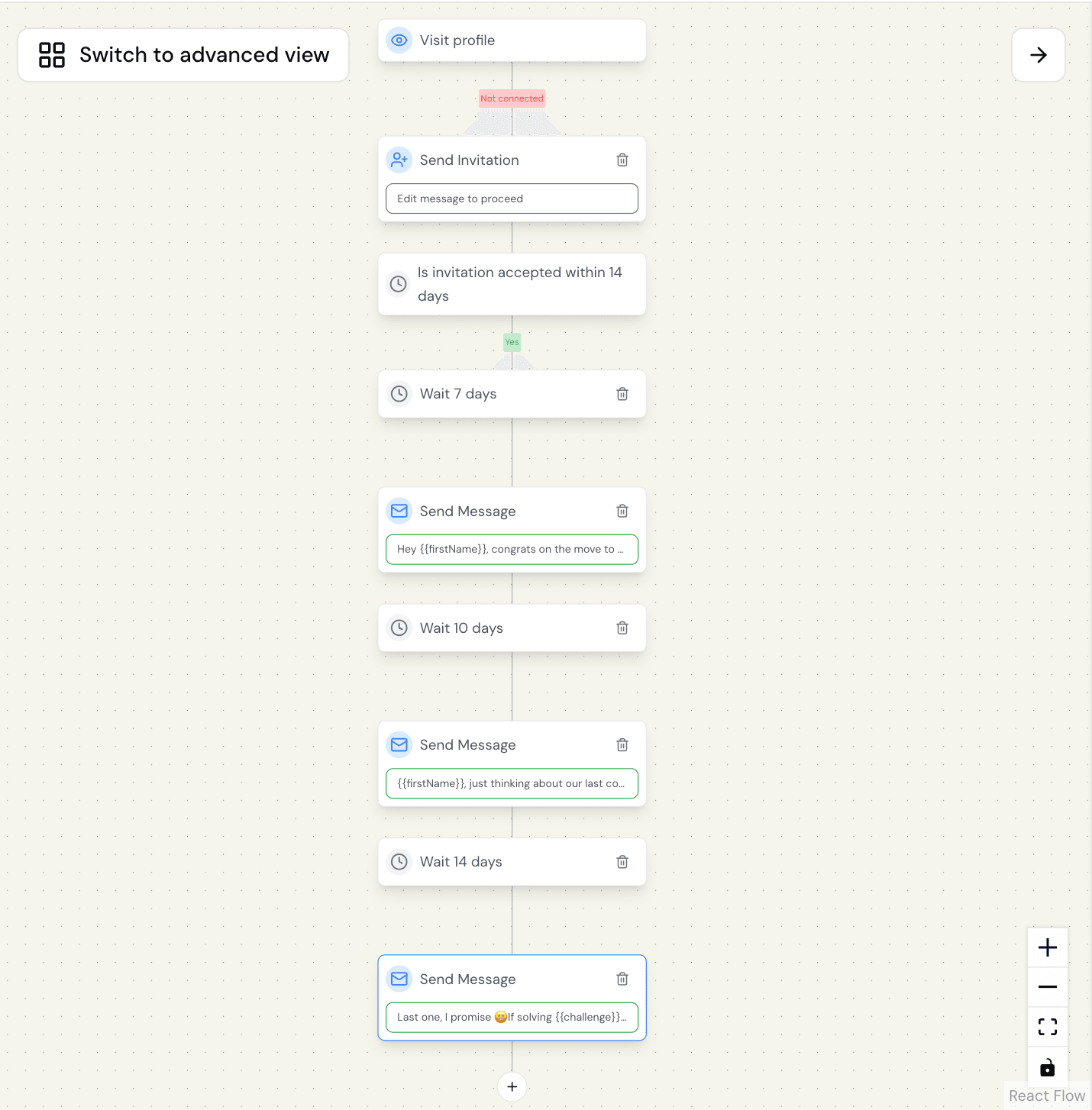
Message 1:
Connection request with no note. Let them accept based on recognizing your name.
Message 2 (7 days after connection acceptance):
"Hey {{firstName}}, congrats on the move to {{newCompany}}!
We talked about {{challenge}} back when you were at {{oldCompany}}. Does {{newCompany}} have similar challenges, or totally different priorities?
Either way, would love to hear how the transition's going."
Message 3 (10 days after Message 2, if no response):
"{{firstName}}, just thinking about our last conversation around {{challenge}}.
If {{newCompany}} is dealing with anything similar, I'd be happy to share what we've learned since we last talked. Or if you went a completely different direction in the new role, totally get it!
Hope you're crushing it at {{newCompany}} either way."
Message 4 (14 days after Message 3, if no response):
"Last one, I promise 😄
If solving {{challenge}} ever becomes a priority at {{newCompany}}, feel free to reach out. Would love to help you win in the new role.
If not, no worries - congrats again on the move!"
Step 7: Let Botdog handle the rest
Once your campaign is live, Botdog automatically:
- Sends connection requests at optimal times
- Waits for acceptances before sending messages
- Personalizes each message with custom fields
- Tracks responses and notifies you when someone engages
Step 8: Make this a continuous process
Don't run this once and forget about it - set a calendar reminder to repeat this process every quarter to make sure you never miss an opportunity.
What to do when job changers respond
When they respond, don't pitch immediately. Continue the conversation:
"That's interesting that {{newCompany}} is dealing with {{challenge}} too. When you're settled in and ready to tackle that, I'd be happy to show you how we've evolved since we last talked.
No rush - I know the first few months are crazy. But feel free to reach out when you're ready to dig into {{challenge}}."
You're positioning yourself as a resource for when they're ready, not forcing a conversation before they've even figured out their new role.
Common objections (and why they're wrong)
"If they were interested, they would have reached back out."
People get busy. Priorities shift. Emails get buried. Your original contact might have left the company. Most dormant leads didn't intentionally ghost you - they just got distracted. LinkedIn re-engagement gives them a low-pressure way to reconnect without the awkwardness of explaining why they disappeared.
"Won't they be annoyed we're reaching back out?"
Most prospects actually appreciate the follow-up - as long as you wait long enough and approach with value instead of pressure. Waiting 30-90+ days removes the awkwardness. Leading with curiosity instead of "book a call!" makes it feel like a professional check-in, not a desperate sales push.
"We already tried email, and they didn't respond."
Exactly. Email didn't work. That's why you're trying LinkedIn. They're actually active there (unlike their buried inbox), your content appears organically (not just when you message), it feels more professional and less intrusive, and they can see your credibility before responding.
"This feels like we're chasing people who don't want us."
You're not chasing them - you're giving them a second chance to engage. These aren't cold prospects. They're people who filled out forms requesting information, talked to your sales team, attended your webinars, or got proposals from you. That's significantly more interest than a random cold lead. You already paid to acquire them - why wouldn't you try to convert them?
The bottom line…
Your CRM contains thousands of warm leads who already know who you are, what you do, and why you might be able to help them. Most of them didn't choose your competitor or decide you suck - they just got busy, distracted, or overwhelmed.
Instead of marking them "unresponsive" and spending thousands more on cold leads, try to re-engage them systematically. Reach out to them on LinkedIn instead of email, lead with value instead of pressure, automate the process so it scales, and track ROI to prove that dormant recovery is cheaper than new lead gen.
If you’d like to automate your LinkedIn outreach with the simplest and easiest tool on the market, try Botdog for free for 7 days and set up your first campaign in less than 3 minutes.