Sequences that keep going until you get a reply
One connection request and a prayer is not a strategy. Botdog runs a multi-step sequence for every prospect, visit their profile, send the invitation, wait for the accept, message, follow up, switch to InMail if they never accept, with if/then branches that react to what the person actually does. You build it once; Botdog runs it for hundreds of people, inside your daily limits.
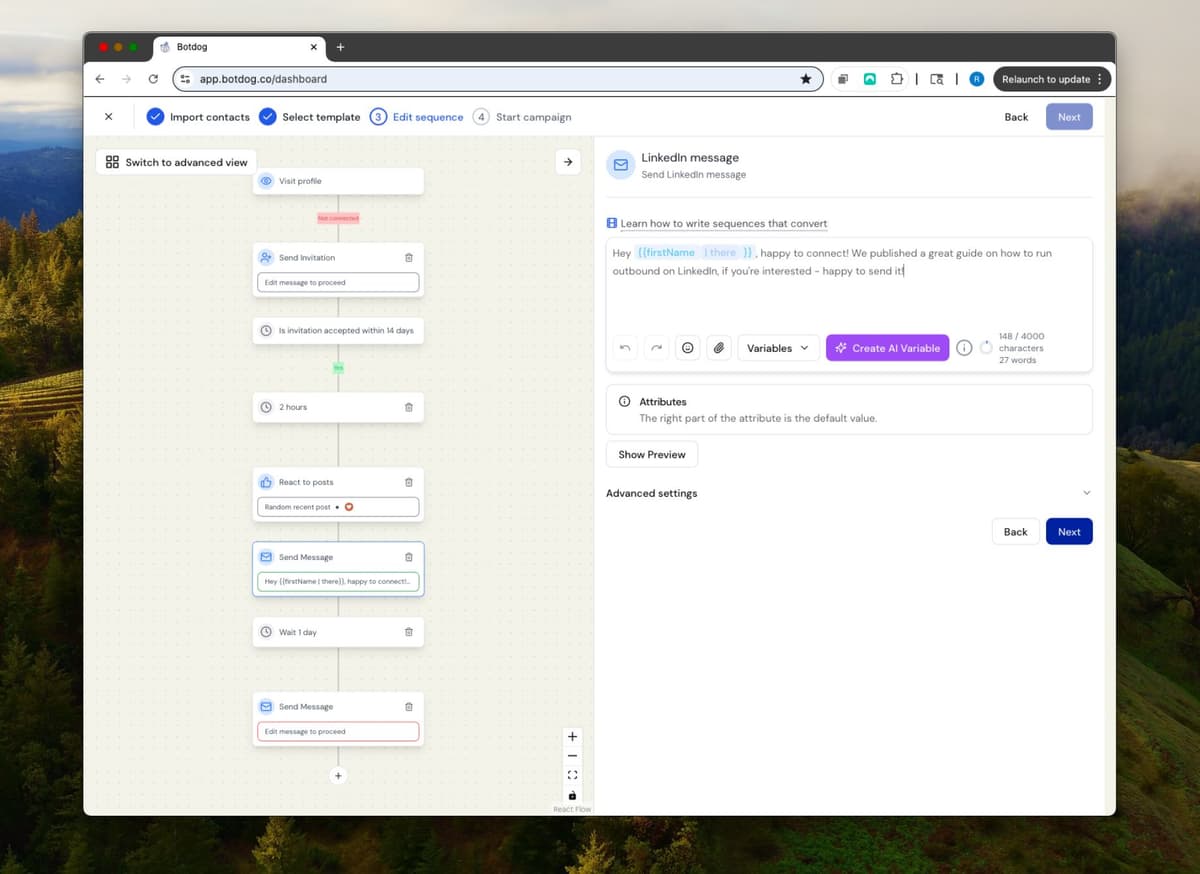
See the Difference
Consistency is the whole game, and humans are bad at it
- ✕
One and done
You send the invitation, forget the follow-up, and the reply that would have come on message three never happens.
- ✕
No branches
The same message goes to people who accepted and people who ignored you.
- ✕
Rebuilt every time
A sequence that worked last quarter lives in a doc somewhere; you build the next campaign from scratch.
- ✓
14 step types
Profile visit, connection request, message, InMail, voice message, react to posts, comment on post (AI), invite to follow your company page, invite to event, AI review, wait, and conditions on accepted / replied / connected.
- ✓
If/then logic
Accepted within 7 days? Message. Not accepted? InMail. Replied? Stop. Already connected? Skip the invitation.
- ✓
Reuse and relaunch
Duplicate any campaign onto a new audience, save it as a template, or add contacts to a completed campaign and review the sequence before it restarts.
Ready to transform your LinkedIn workflow?
Start Your 7-Day Free TrialNo credit card required • Cancel anytime
Built Like a Flowchart
Visual editor with guardrails
Drag steps into a flowchart. Botdog stops you putting two messages back-to-back without a wait, tells you why a step isn't available, and marks template copy as "review before sending".
Messages with attachments
Send images, files, videos and voice notes as part of a step, not just text. Merge tags, custom attributes and AI Variables all work in every message.
Pause one thing, not everything
Pause just the invitations on a campaign while messages keep flowing, or pause the whole campaign. Everything respects your per-action daily limits and active days.
What people say about Botdog
Real stories. Real results.

Kate G.

I like that Botdog is very intuitive, making it easy even for someone who has never used it before or read any instructions to use it immediately. The initial setup was extremely easy, and it's well integrated with our other tools. It saves an enormous amount of time by automating LinkedIn outreach, allowing my sales team to take over only when a lead replies.

Valentin S.

Siva D.
Kathy L.
I like how easy it is to import and automate the request addition in Botdog. It's a simple search on the system and adding the link to Botdog is as simple as it gets. The initial setup was very simple; I just created a username and connected LinkedIn.
Mohamed A.
Botdog is straightforward and easy to use. It helps me get the tasks I need done - fast and without friction. I use it for product and service discovery, and it consistently leads me to insightful conversations with potential customers every week. It is still quite cheap in comparison with other tools.

Kamil J.
Toni H.
🚀 𝐈𝐟 𝐈 𝐖𝐞𝐫𝐞 𝐒𝐭𝐚𝐫𝐭𝐢𝐧𝐠 𝐌𝐲 𝐁𝐮𝐬𝐢𝐧𝐞𝐬𝐬 𝐓𝐨𝐝𝐚𝐲, I’d Skip Manual LinkedIn Engagement and Head Straight to 𝐁𝐨𝐭𝐝𝐨𝐠 💡

Eldad Stinbook
Cloud Evangelist | Infrastructu…
I subscribed -- in the seven-day free trial, I got several meetings booked. Much better response rate than my LinkedIn Sales Nav InMessages.

Greg Miller
Awesome team! Switching to bot dog - I've been using Dripify and it's wayyy too expensive for the value it provides.

Rasmus Chow
Botdog has completely changed how I approach LinkedIn outreach. I went from sending 10 connections a day manually to 100+ automated, and my response rate actually went up.
Sarah Johnson
VP Sales | SaaS
Best LinkedIn automation tool I've tried. Simple to set up, doesn't get your account flagged, and the team support is fantastic. Worth every penny.
Marco Bianchi
Founder | Agency
Kate G.
I like that Botdog is very intuitive, making it easy even for someone who has never used it before or read any instructions to use it immediately. The initial setup was extremely easy, and it's well integrated with our other tools. It saves an enormous amount of time by automating LinkedIn outreach, allowing my sales team to take over only when a lead replies.
Valentin S.
Siva D.
Kathy L.
I like how easy it is to import and automate the request addition in Botdog. It's a simple search on the system and adding the link to Botdog is as simple as it gets. The initial setup was very simple; I just created a username and connected LinkedIn.
Mohamed A.
Botdog is straightforward and easy to use. It helps me get the tasks I need done - fast and without friction. I use it for product and service discovery, and it consistently leads me to insightful conversations with potential customers every week. It is still quite cheap in comparison with other tools.
Kamil J.
Toni H.
🚀 𝐈𝐟 𝐈 𝐖𝐞𝐫𝐞 𝐒𝐭𝐚𝐫𝐭𝐢𝐧𝐠 𝐌𝐲 𝐁𝐮𝐬𝐢𝐧𝐞𝐬𝐬 𝐓𝐨𝐝𝐚𝐲, I’d Skip Manual LinkedIn Engagement and Head Straight to 𝐁𝐨𝐭𝐝𝐨𝐠 💡
Eldad Stinbook
Cloud Evangelist | Infrastructu…
I subscribed -- in the seven-day free trial, I got several meetings booked. Much better response rate than my LinkedIn Sales Nav InMessages.
Greg Miller
Awesome team! Switching to bot dog - I've been using Dripify and it's wayyy too expensive for the value it provides.
Rasmus Chow
Botdog has completely changed how I approach LinkedIn outreach. I went from sending 10 connections a day manually to 100+ automated, and my response rate actually went up.
Sarah Johnson
VP Sales | SaaS
Best LinkedIn automation tool I've tried. Simple to set up, doesn't get your account flagged, and the team support is fantastic. Worth every penny.
Marco Bianchi
Founder | Agency
Frequently Asked Questions About Automated Sequences
Get answers to common questions about this Botdog feature
With Botdog, you can create sequences with UNLIMITED steps - as many as your sales process requires. Mix connection requests, messages, InMails, profile views, post reactions, AI review steps, and company page invitations. Sequences run automatically until your prospect replies or opts out.
There's no limit on the number of steps you can add to your sequences. Create as many touchpoints as your sales process requires. Sequences continue running after someone accepts your connection request and only stop when the prospect replies or opts out.
Botdog is very safe when following our guidelines. We mimic human behavior with random delays between actions, respect LinkedIn's daily limits, and only operate during business hours (8 AM - 7 PM). We strongly recommend using a Premium LinkedIn Account (Sales Navigator, Recruiter, or Premium) - we've never had restrictions with Premium accounts.
You can create sequences with UNLIMITED steps in Botdog - as many as your sales process requires. There's no cap on the number of follow-ups. Mix connection requests, messages, InMails, profile views, and other actions. The sequence continues automatically until your prospect replies.
No, sequences continue running after someone accepts your connection request. They only stop when the prospect replies to your message. The behavior depends on how you design your sequence, but mostly sequences continue until the person replies. This ensures you can follow up with accepted connections without manually tracking who to message next.
Yes, you can use custom fields and merge tags like {{company}} or {{pain_point}} throughout your entire sequence. Import a CSV with any custom columns, and each becomes a variable you can use in every step of your sequence for true personalization at scale.
Ready to Make the Jump?
Join thousands of professionals who are growing their network on autopilot. Start your journey today with our 7-day free trial.

Trusted by 5,000+ sales professionals worldwide
